TABLE OF CONTENTS
- Prerequisites
- Demo files
- 1. Processing Individual Records Without Context
- 2. Processing Individual Records With Context
- 3. Generating New Data Without Inputs
- 4. Processing the Whole Dataset Using Only Context
- Additional Tips
Overview
The AI Request block in Omniscope uses large language models (LLMs) to generate, transform, or analyse text. You can guide the model with a System Prompt to define its role and tone, a User Prompt to provide task-specific instructions, and an optional Context Input to inject external datasets for reference or analysis. This flexibility supports a wide range of applications, from producing natural-language descriptions to carrying out dataset-level investigations.
At a high level, the block builds an AI request either once or once per record, depending on whether a Requests dataset is connected. If no Requests dataset is connected, the block sends a single request using only the text configured in the Request and Behaviour & context tabs. If a Requests dataset is connected, it creates one AI request per row, combining any static text with selected row-level fields.
This makes the block both flexible and explicit. You can keep things simple by entering only a short instruction, or you can construct more advanced prompts by combining:
- Request text for the main user instruction
- Request fields from the Requests input for row-specific content
- System prompt text for consistent behaviour, tone, or role
- System prompt fields for row-specific guidance at the system level
- Context datasets for shared background information included with every request
- Model and output options to control the response format and diagnostics
The Request tab defines what the AI should do. The Behaviour & context tab defines how it should behave and what background information it should use. The Options tab controls which model is used, where the response is written, and whether to include extras such as the full constructed prompt, reasoning output, metadata, or JSON output constraints.
In practice, this means the block can support several different patterns: row-by-row text processing, row-by-row processing with shared reference data, one-off generation without any input dataset, and whole-dataset analysis using a context dataset alone.
It can:
Generate or transform text fields for each record in a dataset
Leverage external datasets as context to improve answers
Create synthetic datasets from scratch
Analyse entire datasets as a whole
Below are four practical use cases that illustrate the different ways you can apply the AI Completion block.
Prerequisites
This block requires AI-features to be enabled. Please consult this knowledge-base article on how to enable them: https://help.visokio.com/a/solutions/articles/42000111598
After AI-features are enabled and an AI provider configured, make sure to select a default model in the AI integration "Workflow executions".
Demo files
IOZ demo files are attached to this article to be downloaded and imported into Omniscope.
1. Processing Individual Records Without Context
Scenario:
A UK estate agency needs polished property descriptions for its listings. Each record has structured fields (bedrooms, location, price, features), but no descriptive copy.
Setup:
System Prompt:
“You are a professional UK-based property copywriter. Write concise and engaging property descriptions.”
User Prompt:
Bedrooms, Bathrooms, Size, Location, Price, Features
Sample input data:
| Property ID | Bedrooms | Bathrooms | Size (sq ft) | Location | Price (GBP) | Features |
|---|---|---|---|---|---|---|
| 101 | 3 | 2 | 1450 | Bristol | £475,000 | Garden, garage, newly fitted kitchen |
| 102 | 2 | 1 | 900 | Brighton | £320,000 | Balcony, sea view |
| 103 | 4 | 3 | 1750 | Oxford | £650,000 | Conservatory, driveway, study |
Workflow:
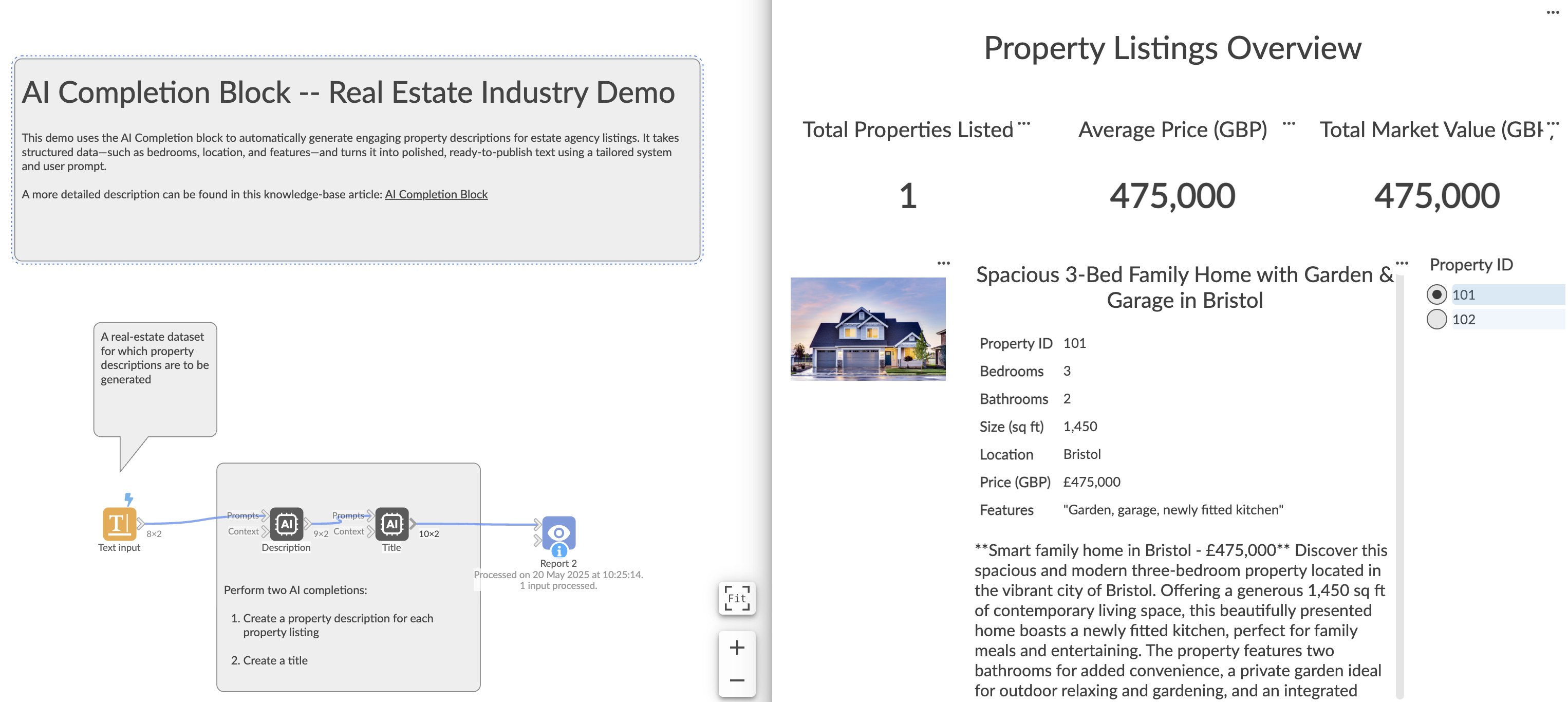
Example AI Output:
“Located in vibrant Bristol, this spacious three-bedroom, two-bathroom home offers a newly fitted kitchen, private garden, and secure garage—perfect for modern family living.”
2. Processing Individual Records With Context
Scenario:
An IT support team wants to automatically draft customer responses to incoming tickets. Each ticket should be solved with the help of a knowledge base of troubleshooting articles.
Setup:
System Prompt:
“You are an IT support agent. Write clear, precise, and solution-focused responses.”
User Prompt fields: Issue Category, Issue Description
Context dataset: Knowledge base articles
Sample input tickets:
| Ticket ID | Customer Name | Issue Category | Issue Description | Priority |
|---|---|---|---|---|
| 101 | Alice Johnson | Billing | Charged twice for last month’s bill | High |
| 102 | Bob Smith | Technical | Unable to connect to the server | High |
| 103 | Charlie Brown | Account | Forgot my account password | Medium |
Sample knowledge base:
| Article ID | Title | Content | Category |
|---|---|---|---|
| 201 | Resolving Duplicate Billing | Contact support with your invoice number… | Billing |
| 202 | Fixing Server Connection Issues | Check internet, restart router, clear cache… | Technical |
| 203 | Resetting Account Password | Use “Forgot Password” on login screen… | Account |
Workflow:
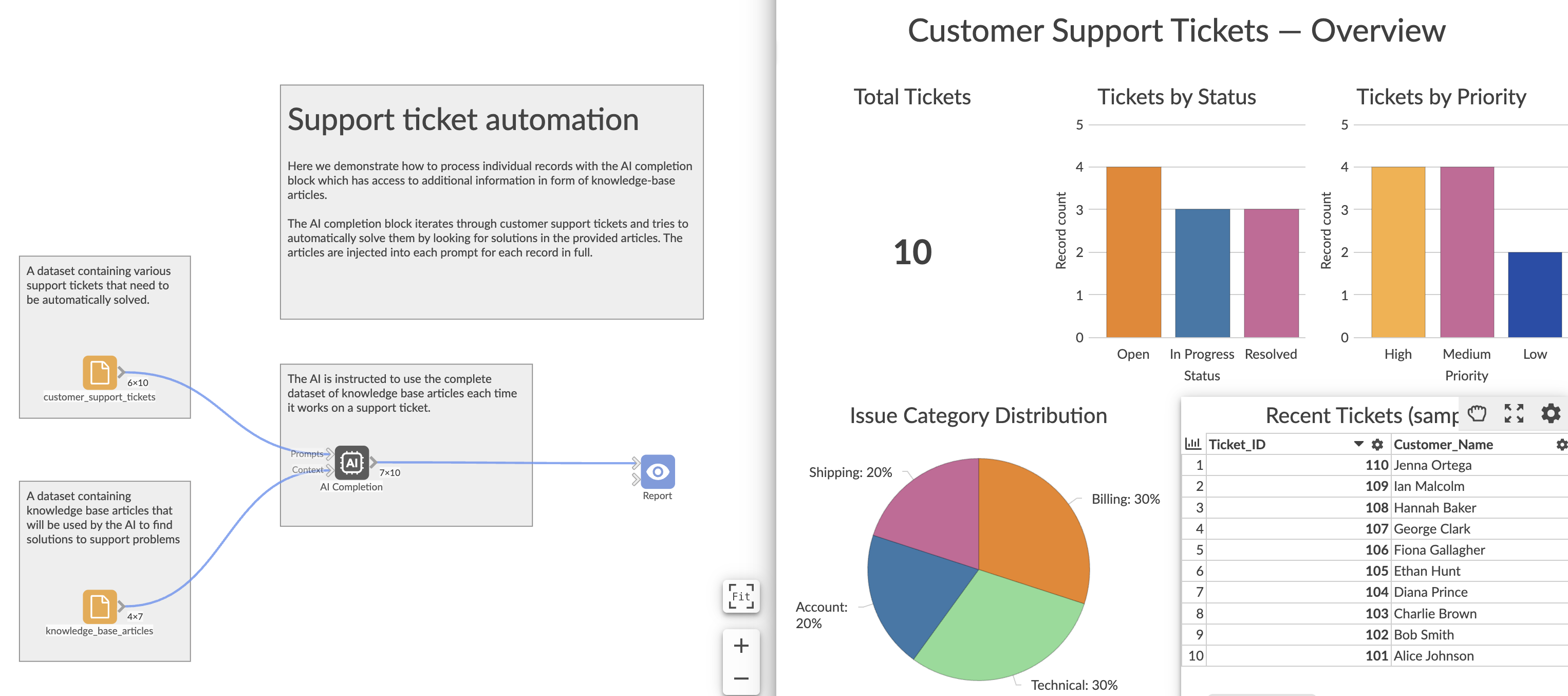
Example AI Output (Ticket 101):
“Hi Alice, we’ve identified a duplicate charge and issued a refund to your original payment method. It will appear within 3–5 business days.”
3. Generating New Data Without Inputs
Scenario:
You need a synthetic dataset for testing travel booking scenarios. No input dataset is provided—the AI generates fresh records based solely on prompts.
Setup:
System Prompt:
“You are a world-class synthetic data generator. Always create realistic, quirky, and internally consistent datasets in JSON format.”
User Prompt:
“Generate 20 synthetic Cold War–era tourism bookings to spy-thriller destinations.”
Workflow:
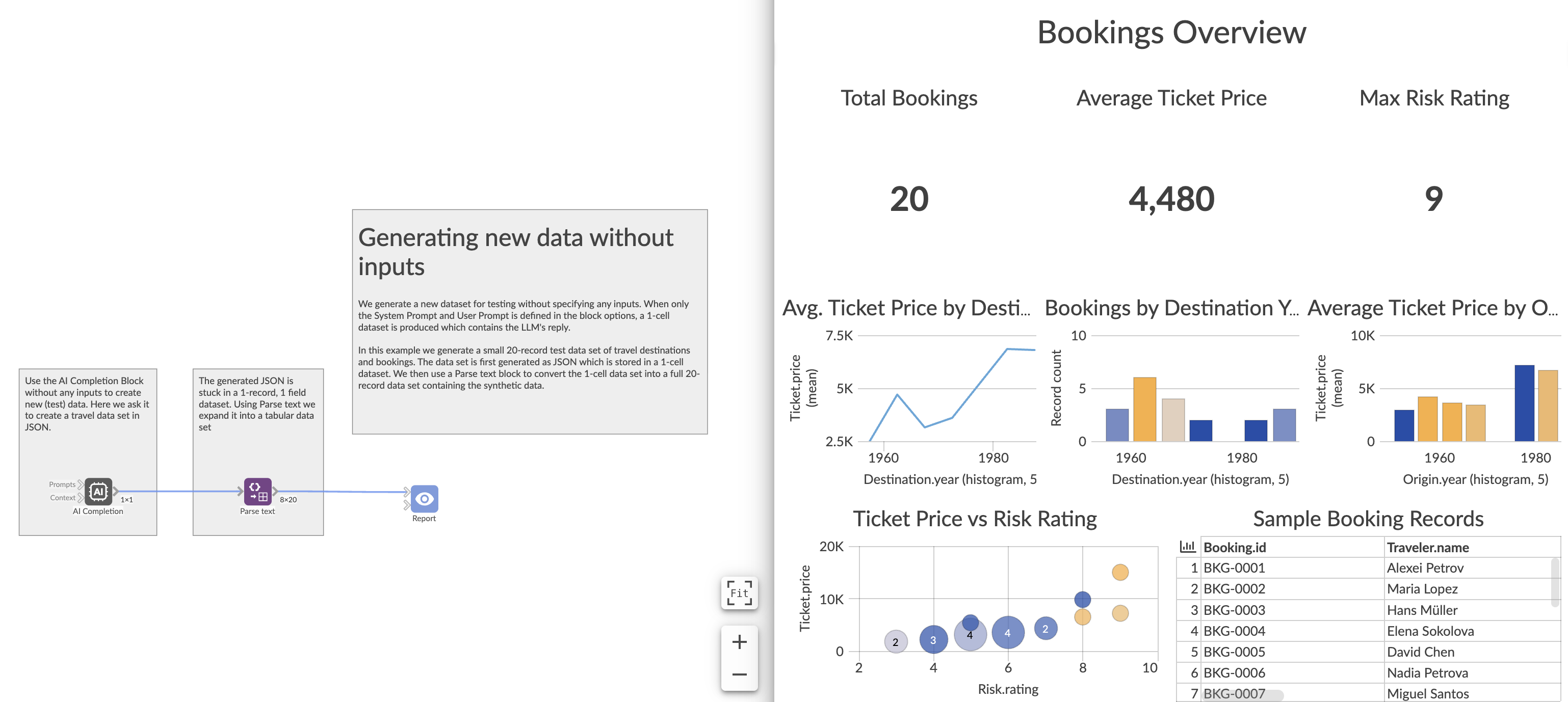
Sample AI Output (3 rows extracted):
| Booking ID | Origin Year | Destination Year | Historical Event | Risk Rating | Ticket Price | Traveler Name | Traveler Feedback |
|---|---|---|---|---|---|---|---|
| BKG-0001 | 1960 | 1961 | Berlin Wall tour at Checkpoint Charlie | 6 | 4,200 | Alexei Petrov | Border guards surprisingly polite |
| BKG-0002 | 1959 | 1962 | Cuban Missile Crisis vantage trip | 8 | 9,800 | Maria Lopez | Havana buzzing with tension |
| BKG-0003 | 1961 | 1961 | East Berlin photo tour | 5 | 3,200 | Hans Müller | Souvenir stamps oddly complex |
4. Processing the Whole Dataset Using Only Context
Scenario:
A compliance team wants to detect possible financial fraud in an entire dataset of transactions. Instead of row-by-row processing, the whole dataset is injected into the AI as context.
Setup:
System Prompt:
“You are an expert fraud analyst. Review the dataset as a whole and classify it as Normal, Suspicious, or High Risk.”
Context dataset fields: Amount, Date, Merchant, Description
No main input dataset
Sample transactions:
| Account ID | Amount | Date | Description | Merchant | Transaction ID |
|---|---|---|---|---|---|
| A1001 | 12.75 | 2025-07-01 | Latte and pastry | CafeBrew | T1 |
| A1002 | 8.50 | 2025-07-01 | Short taxi ride | CityTaxi | T2 |
| A1001 | 45.20 | 2025-07-02 | Weekly groceries | GreenGrocers | T3 |
Workflow:
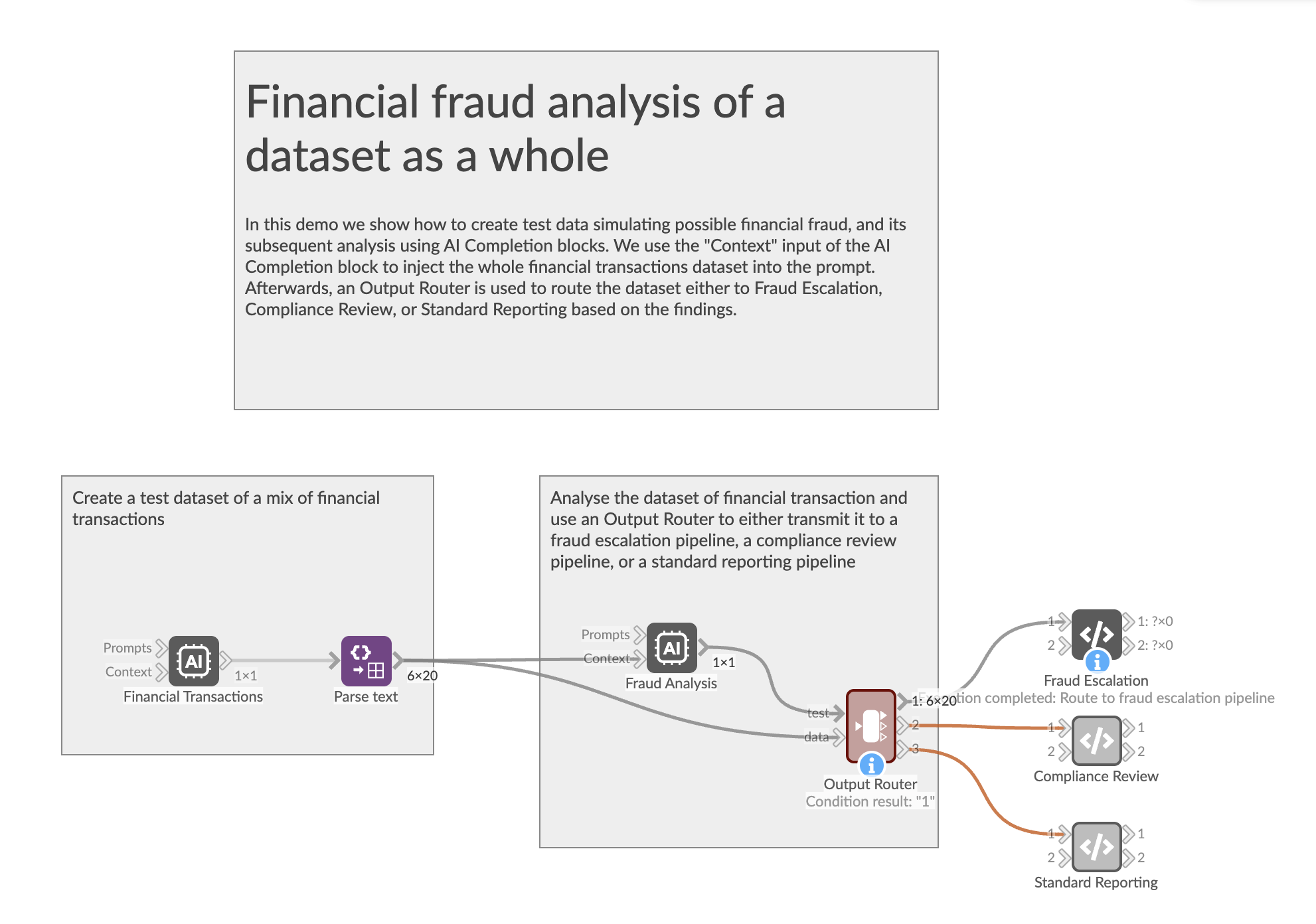
Example AI Output:
“High Risk”
Additional Tips
Custom tone: Adjust the System Prompt to change tone—e.g., more formal or more casual.
Multilingual listings: Instruct the model to return the output in other languages (e.g., Welsh, French) using the system prompt.
Record-level prompts: Use different system or user prompts in each record to vary the style of the reply.
Was this article helpful?
That’s Great!
Thank you for your feedback
Sorry! We couldn't be helpful
Thank you for your feedback
Feedback sent
We appreciate your effort and will try to fix the article